Every UI inconsistency,
pinned to the page.
EvenUI is a design linter for the web. It finds off‑system spacing, type, colour and components on any page, pins each issue with the CSS line behind it, and checks it all against your design system.

Everything a careful designer would catch, on every element.
EvenUI reads the computed styles of everything visible on the page, works out the system it’s really using, and flags what doesn’t fit.
Spacing
Margins, padding and gaps off your scale, and uneven gaps between items in a row.
Typography
Sizes and weights off the type scale, headings styled several ways, and fonts outside the system.
Line-heights
Line-heights a pixel off a common one, and body copy set on tight lines or left at normal.
Colour
Near-duplicates like #2463eb beside #2563eb, too many greys, and colours off your tokens.
Contrast
Text checked against WCAG AA or AAA, with the nearest colour that passes.
Radius and borders
Corner radii and border styles that nearly match the ones the page already uses.
Shadows
One-off shadows that should be one of a few elevations.
Components
Buttons, inputs and cards that drift from their siblings.
Sizing
Controls and icons a few pixels off the sizes the page already uses.
Interaction states
Every control hovered, focused and pressed: no visible keyboard focus, hovers that shift the layout, and disabled buttons that look enabled.
See the problem on the page, and the line that caused it.
Click an issue and every affected element is outlined on the page. The inspector shows the winning CSS declaration, its file and line through source maps, and the fix as CSS or as a prompt for your agent.
Desktop to mobile in one click
Mark what’s meant to differ
See where any value is used

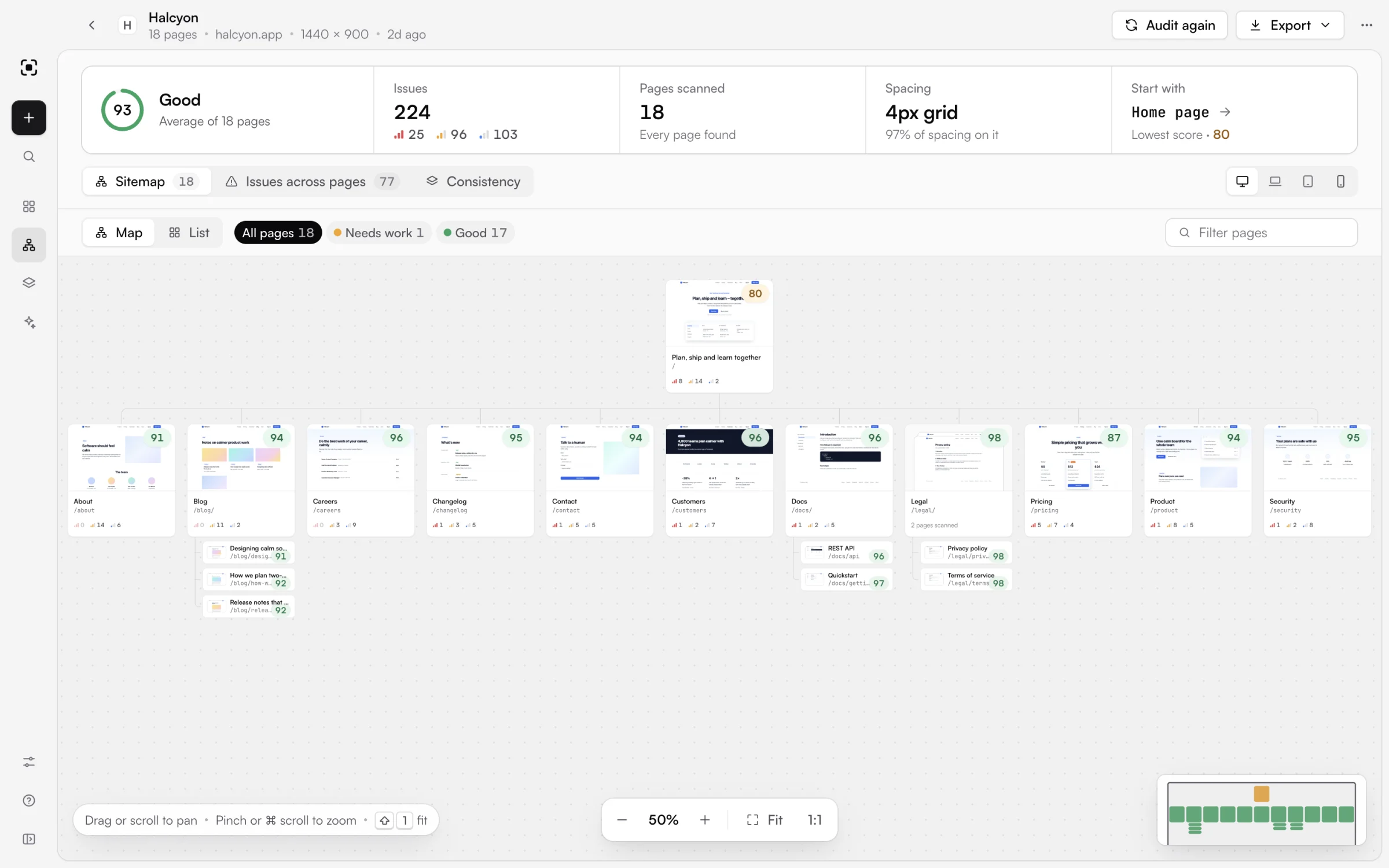
Every page of a site, scored on one map.Pro
Crawl a whole site from its home page and lay every page out as a sitemap on an endless canvas, each with its own score. Issues that pages share are grouped, so you fix them once.
Pan, zoom and fit
Values that drift between pages
The whole site as one HTML file
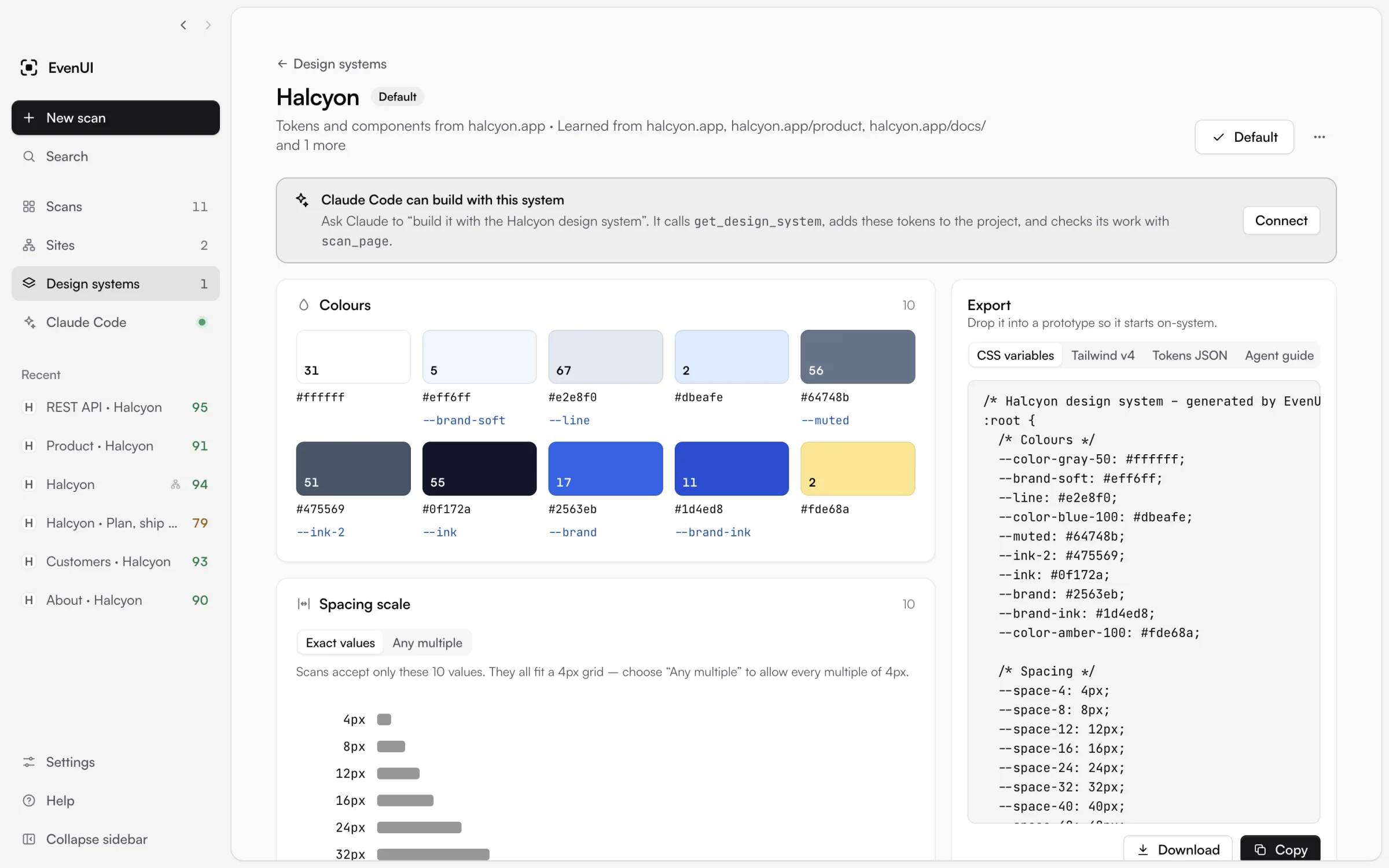
Capture your system once. Check every page against it.
Learn a design system from pages that get it right, from a repository or from a tokens file. Scans then flag anything off-system, and you can hand the tokens to a prototype as CSS variables, Tailwind v4 or JSON.
Colours, spacing, type, radii and shadows
Every result says which system
Tokens for prototypes and agents
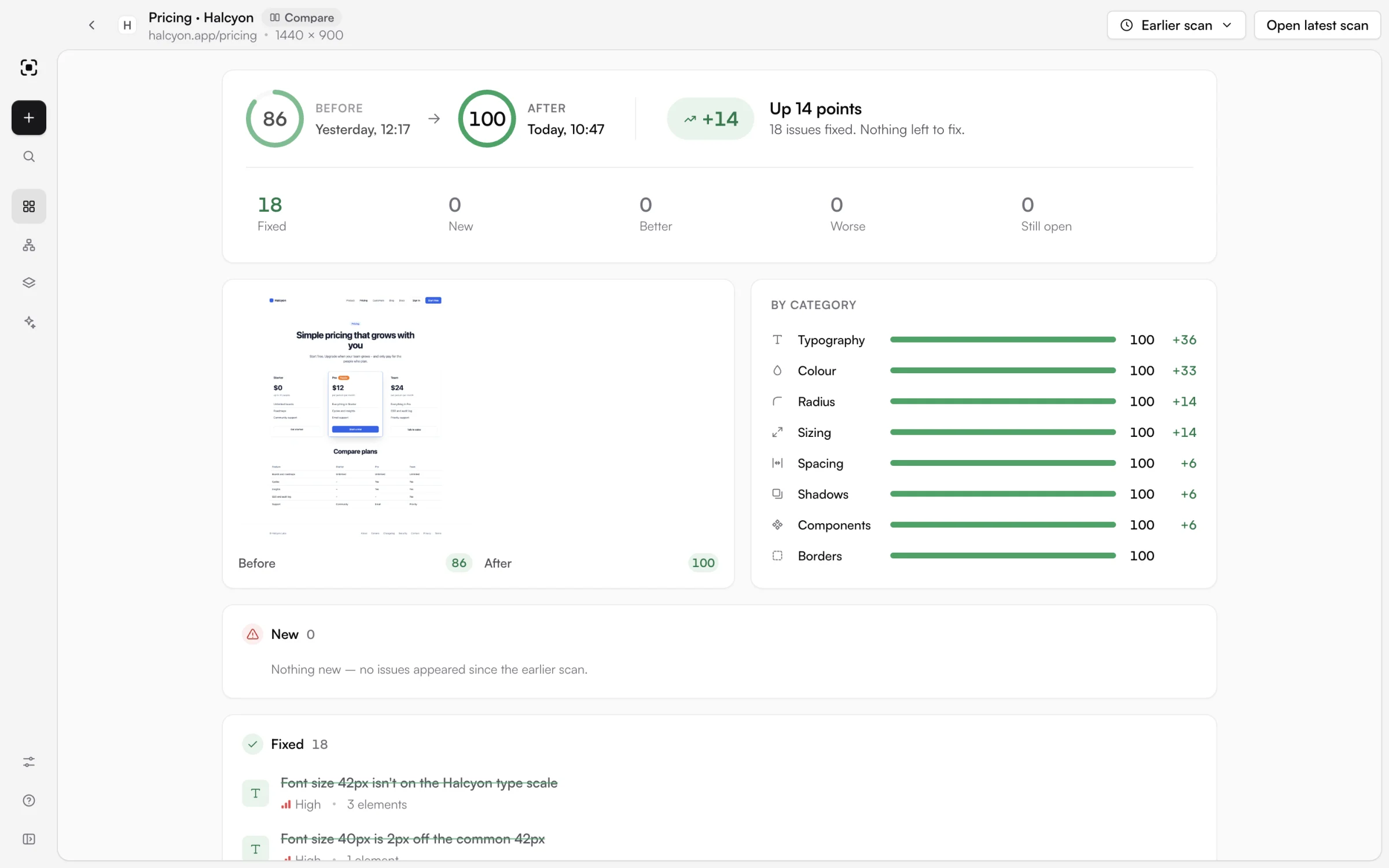
Prove the fix, and catch what came back.
Scan again and EvenUI matches each issue by what it is, not by an id, so you see exactly what was fixed, what’s new, and what got better or worse. Score history and CI checks keep it that way.
The score before and after
Fixed, new, better and worse
Fail a build only on new issues
Your agent builds on‑system, then proves it.
EvenUI adds itself to Claude Code in one click. Claude loads your design system before it writes a line, scans what it built, fixes what’s off, and shows you the score before and after.
- 01Reads your tokens with
get_design_system - 02Scans the dev server with
scan_page - 03Gets each element, file and line with
get_finding - 04Confirms the fixes with
compare_scans
Works with Cursor and other MCP clients too. Scans Claude runs appear in the app straight away. How to set it up
> Build the pricing page with the Halcyon design system, then audit it with EvenUI and fix anything off-system.
⏺ evenui · get_design_system Halcyon
10 colours · 10 spacing steps · 4px grid
⏺ Write src/pages/pricing.tsx
⏺ evenui · scan_page localhost:5173/pricing
Score 86 · 18 issues
⏺ evenui · get_finding × 6
⏺ Update src/pages/pricing.css
⏺ evenui · compare_scans
86 → 100 · 18 fixed · 0 new
Free for every page. Pro for the whole site.
Every install starts with 14 days of Pro. Pay once and it’s yours.
Free
$0forever
Everything you need to audit a page and keep it on-system.
- Scan any page, local or live
- Every check, with WCAG contrast
- Design systems from a site, repo or tokens
- Claude Code and MCP
- Before and after, history and CI
Pro
$34.99$49.99one-time
LAUNCH30 until 26 October, applied at checkout
$49.99one-time payment
For teams that audit whole sites and share the results.
- Everything in Free
- Site audits: crawl and score every page
- Issues shared across pages, fixed once
- Watch a site: audited every day or week, with what changed
- Stress tests: worst-case data, and every place it breaks
- Shareable HTML reports for a page or site
- Up to 3 computers, Mac or Windows
Secure checkout by Lemon Squeezy. Your licence key arrives by email straight away.
Thanks for buying EvenUI Pro. Your licence key is on its way to your inbox: paste it into Settings → Licence.
Get EvenUI 1.6.0
Free to download. Installs in a minute and updates itself.
Not sure which Mac you have? Open the Apple menu → About This Mac. All releases and notes
Opening it for the first time: on a Mac, if it says it can’t check EvenUI, go to System Settings → Privacy & Security → Open Anyway. On Windows, choose More info → Run anyway.
Questions, answered.
Pricing, licences, privacy and what EvenUI runs on.
What’s free, and what does Pro add?
Scanning a page, every check, design systems, Claude Code, comparisons, history and CI are free, with no time limit. Pro adds site audits, watching a site on a schedule, stress tests with worst-case data, and shareable HTML reports.
Is there a trial?
Yes. Every new install has Pro for 14 days. When the trial ends, the free features keep working.
How do I unlock Pro after buying?
Lemon Squeezy emails your licence key straight away. Paste it into EvenUI under Settings → Licence. You can find it again under My Orders on Lemon Squeezy.
How many computers can I use it on?
One licence works on up to 3 computers, Mac or Windows. One-time payment, no subscription.
Do my pages leave my computer?
No. Pages are loaded and measured on your computer, and your scans and design systems are stored there too. There’s no account and no tracking. EvenUI only goes online to check for updates and to check a licence key.
What can it scan?
A live site, a local dev server or an .html file. It loads the page in Chromium and reads the computed styles of every visible element, so it works with any framework.
Does it work with agents other than Claude?
Yes. Its MCP server works with Claude Code, Cursor and any other MCP client. In the app, Claude Code → Add to Claude Code sets it up in one click.
My Mac or PC asks before opening it. Is that expected?
Yes, the first time. EvenUI isn’t signed with an Apple or Microsoft certificate yet, so the system asks you to confirm. On a Mac, open EvenUI once, then go to System Settings → Privacy & Security and choose Open Anyway. On Windows, choose More info → Run anyway. After that it opens like any other app.
Which systems does it run on?
macOS on Apple silicon or Intel, and Windows 10 and 11 (64-bit). The Windows installer doesn’t need admin rights. Both update themselves from the sidebar.